If you’ve been questioning the value of customer relationship management (CRM) software, you can stop now. A recent study by Thomson Data found that a massive 79% of leads don’t convert without a CRM. Just think about that, nearly 4 out of 5 leads are lost to the ether because a business doesn’t use a CRM tool!
Okay, so now you may be having second thoughts about expanding the budget of your existing tech stack. The same Thomson study also found that a properly implemented CRM system can yield an ROI of 245%. Do we have your attention now?
The internet is an ocean full of CRM treasures and landmines. But have no fear! We’ve done most of the work for you. CRM software can level up any business by improving the way your business works and enhancing the customer experience. You’ve come to the right place to find the best CRM software on the market today.
Our top recommendation for customer relationship management software:
Our top recommendation for best CRM software: Salesforce Sales Cloud
- The best CRM software can work for any business–Sales Cloud is packed with features that even Enterprises will need.
- Automation and customer personalization are key to increasing productivity and enhancing sales and marketing performance. Salesforce Sales Cloud does this at an elite level.
- The best CRM software is packed with flexible features and pricing plans that can scale with any business. Expanding your product line or customer base is a cinch with Sales Cloud.
The Best CRM Software
- Salesforce Sales Cloud– The most comprehensive CRM and best overall
- PipeDrive– Best sales-focused CRM for businesses with high sales volume.
- Zoho CRM– Best for small businesses and Zoho platform users
- Zendesk Sell– A great option for companies already using the Zendesk platform
- Hubspot CRM– Best free-forever CRM for small businesses
- Freshworks Freshsales– Best for businesses that want to personalize customer engagement
- Less Annoying CRM– Easy to use CRM for those wanting only core capabilities
- Keap– the best CRM for email marketing
The Top CRM Software- Reviews
1. Salesforce Sales Cloud – The most comprehensive CRM and best overall
Salesforce is a global leader in customer relationship management software and one of the original innovators of CRM today. Their Sales Cloud app is loaded with features and functionality that make it suitable for businesses of all sizes.
The Salesforce platform comes with all the desired core features that any business needs. These features include things like being able to track the customer journey from the lead stage to signed contracts, integrate email campaigns with Gmail and Outlook, and pull up highly detailed and customizable reporting.
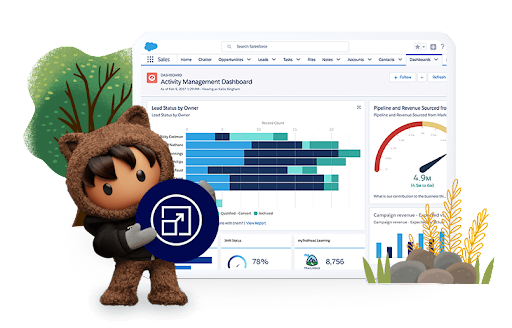
This cloud-based CRM solution is built to scale with any business. It is also packed with social collaboration tools and a healthy third-party app marketplace. This means you get tons of integrations to fit nearly any workflow or operational process that suits your fancy.
The platform features plenty of workflow automation for managing and closing leads. Ther is also AI assistance for nearly all customer interactions. More advanced features of the Sales Cloud platform include:
- Opportunity Management– this feature identifies the most perfect opportunities for your team.
- Contact Management– track customer and lead details like contact history, communications, and social media mentions.
- Sales Performance Management– set, alter, track, and update sales goals in real-time
- Visual Workflow– easy to use drag and drop UI for sharing and tracking lead nurturing. This helps the entire team stay focused and collaborate effectively.
- First Feed Feature– Lets individual team members prioritize the dashboard feed so that they will get the most important information first.
- Revenue Intelligence– powerful analytics reporting for a high level of accurate forecasting of the complete revenue lifecycle.
Pros:
- Covers a wide range of business CRM needs
- Workflow automation and predictive analytics
- Lots of integrations
- Can track every detail of the sales funnel and customer journey
- 24/7 customer support via email, phone, and helpdesk tickets
Cons:
- Any plan besides the Essential may be too expensive for small businesses
- Steeper learning curve than most
| Software | Our score | Pricing |
| Salesforce Sales Cloud |  |
$25/month |
Many providers like SaleForce offer trials of 30 days or less. In these situations, it’s almost always best practice to start the free trial. This lets you and your team break yourselves into the app before committing to the wrong platform.
2. Pipedrive – the most sales-focused CRM

PCRM services have evolved to do a lot of things these days. However, Pipedrive is one of the platforms that focus on what it does best: sales. The platform comes with support for up to 16 languages and is used by more than 90,000 businesses.
With Pipedrive, you get all the tools to manage your leads. For lead management, you can track everything from forms, signups, and more in real-time. A visual sales pipeline where you can manage, track, and customize each stage for each rep.
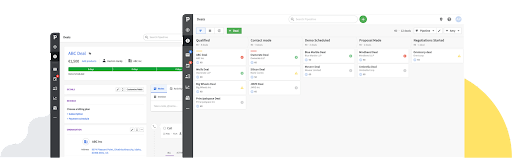
One of the big capabilities that sets Pipedrive apart from the rest, is advanced chatbot capabilities. Create intelligent and customized chatbots for your website that can qualify leads and promote engagement. The chatbots can answer customer questions and get them to the right people effectively and promptly.
Also featured is a full suite of communication tracking for contacts that include calls, emails, and chats. You and your team can also schedule contacts from the same interface. Other shining features are unlimited custom fields for information gathering and comprehensive lead source data reports.
Pros:
- Easy to add and edit deals, values, win probabilities, and close dates in real-time
- Full custom reports for revenue and activity tracking
- Sales Assistant AI optimizes your workflow and sales performance by suggesting automation functions
- Affordable
- 24/7 chat and email support
Cons:
- Limited functionality compared to other options
- No ability to create a separate contact list for new leads
| Software | Our score | Pricing |
| Pipedrive | |
$12.50/month |
3. Zoho CRM – Best for small businesses and Zoho platform users
 Zoho is one of the most popular service providers on the market today. Their CRM platform is used by over 250,000 businesses in 180 countries. This customer relationship management suite is full of popular features and customizable options to fit the needs of most businesses.
As expected, this flagship CRM is built to support and integrate seamlessly with other Zoho products like Zoho Sales, Zoho Invoice, And Zoho campaigns. This allows for your reps and sales agents to scrape important customer data and discover customer profiles. They can also easily attach voice notes and add details to any existing records with ease.
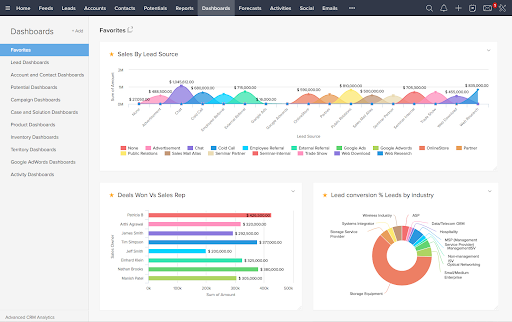
What it means for Zoho users is they get an efficient and automated boost to any lead generation activities. But you don’t need to have existing Zoho products to enjoy the best features of the platform. Powerful sales force automation helps save your team when it comes to things like lead management, contact management, deal management, and general workflow automation.
Zoho CRM also brightens things up with its Canvas tool for design. This feature provides an intuitive drag and drop interface that not allows you to easily customize templates and forms, it lets your team add a creative visual touch! Digging around in a CRM daily can be quite a grind so it’s the little things like this that help make a difference. There’s also predictive analytics, process management, and much more.
Pros
Cons
| Software | Our score | Pricing |
| Zoho CRM | |
$14/month |
4. Zendesk Sell- A great option for companies already using the Zendesk platform
 Zendesk has been one of the providers leading the way when it comes to customer service tools and products. Zendesk Sell is their CRM offering that focuses on boosting collaboration between sales and other departments. They call their product a “modern sales CRM to help accelerate revenue.”
Of course, Zendesk Sell comes with built-in interoperability with other Zendesk apps such as Zendesk Service and the Zendesk Talk. Users can expect all the bells and whistles when it comes to features including:
- A complete view of all contact interactions
- Sales prospecting capabilities to track and improve conversions
- Advanced analytics w/ customized reporting and forecasting
- Native integrations and loads of options with a massive App Marketplace
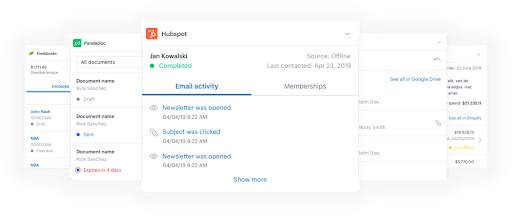
Two of the more unique Zendesk features are its sales email intelligence suite and the native dialer. The email intelligence tools allow for tracking, notifications, and automation with email templates. You also get out-of-the-box reporting tools to examine metrics and improve your email outcomes.
The native dialer makes it easy for your team to make customer calls and send texts without having to leave the app. While working through contacts, they can just click on any phone number to make a call! Any outgoing or incoming call can also be automatically logged and recorded.
Pros:
- Plugs right into other Zendesk products
- Sales email intelligence suite
- Native Dialer
- Loads of customization and features with apps and integrations
Cons:
- Might be expensive for smaller businesses
- Feature list might be overwhelming for those wanting simplicity
| Software | Our score | Pricing |
| Zendesk Sell | |
$19/month |
5. HubSpot CRM – Easy to use CRM for those wanting only core capabilities
 HubSpot has been a major player in boosting customer service and engagement for businesses all over the world. While they have many paid options with much more features, the forever-free plan comes with a lot of the core functions solopreneurs and SMBs may require.
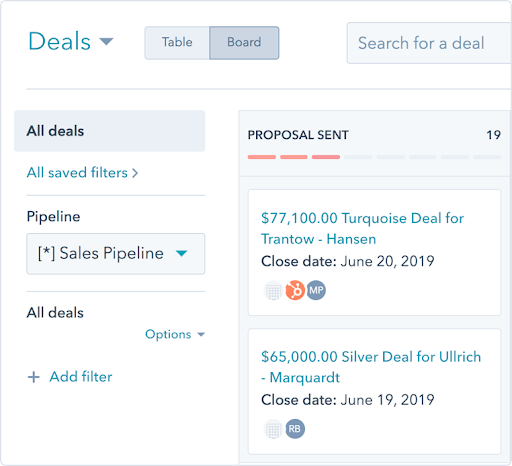
With HubSpot CRM, you get full visibility of the sales pipeline with real-time contact management. This is boosted with activity tracking, individual performance metrics, and other types of detailed reporting. Other features include call tracking, email tracking, and a meeting scheduler.
You can also connect your calendar and email through Gmail and Outlook integrations and use the intuitive email template builder to automate interactions. There is a lot here for managers, reps, marketers, customer service teams, and even business owners. Other features included in the free plan are:
- Deal tracking and pipeline management
- Live chat and chatbot builder
- Customizable real-time reporting dashboard
- Form and Landing page builder
- Ad management tools
- Contact database and management
Best of all perhaps, you can add unlimited users with unlimited customer data usage. However, you only get up to 1,000,000 contacts in the free plan. The good news is that you can always opt to upgrade to a paid plan if you decide to implement more advanced features like AI and automation.
Pros
Cons
| Software | Our score | Pricing |
| HubSpot CRM | |
Free |
6. Freshworks Freshsales- Best for businesses that want to personalize customer engagement
 Freshsales is the expansion and evolution of Freshworks’ original Freshdesk platform. The product is an AI-driven CRM that gives you a complete 360° view of sales. All the tools for contact management are here but there is so much more including deal management, email integrations, and sales reporting.
Every customer interaction is given context whether it be a live chat, email, or a phone call. And just about every mundane process can be automated. What this all adds up to is laser-focused attention and quicker closing of deals by your team.
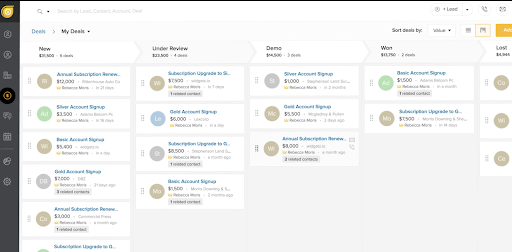
Taking things up a notch from your basic CRM, Freshsales features an AI-powered assistant named Freddy. This assistant uses machine learning to deliver valuable insights and predictions to you and your team. Freddy can also make recommendations to help guide sales reps and support agents for a better conversion rate.
Another important capability of Freshsale is built-in cloud telephony. This lets users place and make calls straight from contact and deal management. It streamlines the process of nurturing leads and gaining conversions by allowing agents to work from one space. Freshsales takes it a step further by providing call analytics and reporting to guide and improve your sales calls.
Pros
Cons
| Software | Our score | Pricing |
| Freshsales | |
$15/month |
7. Less Annoying – Easy to use CRM for those wanting only core capabilities
 Implementing new tools for your business can reap great benefits. But the adoption of new tech can sometimes be frustrating and downright annoying to learn. You can avoid hair-pulling by going with Less Annoying CRM (LACRM).
This platform has been designed for ease of use with individuals and small teams in mind. But don’t let its simplicity fool you. The UI has been recently designed and is now even more intuitive. It’s not flashy, but just about anyone should be able to find what they need with minimal guidance.
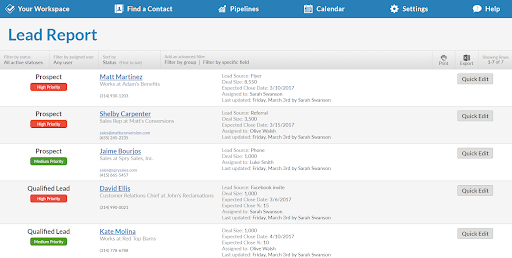
Adding new contacts is a breeze from within the app, but you can also import spreadsheets or forms from your Google account. Other than initiating your contact management, there isn’t much to set up here. LACRM expects users to be up and running within an hour or less.
As part of the central team hub, you can view and manage all events and tasks on one calendar which can be synced with Google Calendar. You also get straightforward lead reporting, email logging, daily agenda emails, and one-click exporting. And because the app is web-based, your team can get full functionality on any device of their choice with no installs required.
Pros
Cons
| Software | Our score | Pricing |
| Visit Less Annoying CRM Now | |
$15/month |
8. Keap- the best CRM for email marketing automation
 With 20 years of experience and more than 200,000 customers, Keap knows CRM as well as any. Their CRM platform is all about helping businesses and individuals make the most of their time. How does it accomplish this? Through clever automation of customer interactions and team workflows.
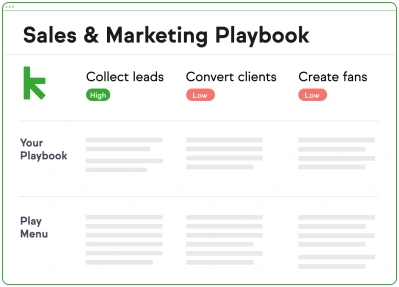
Your sales team will find every feature for tracking leads and managing the pipeline is intuitive yet powerful. The Keap playbook will help guide reps through optimal tactics for collecting and converting leads.
There is plenty of marketing focus in the Keap application as well. These tools help your team to create and implement advanced marketing campaigns while automation takes care of the boring stuff. You can automate and personalize text messages to customers while tracking open rates.
But the real marketing power of Keap lies within its email marketing automation. The platform comes packed with beautiful templates for newsletters and broadcasts. You can automate the email triggers and personalize every single one. Additionally, you get loads of tracking metrics including behavioral data and seamless A/B testing and reporting.
Pros
Cons
| Software | Our score | Pricing |
| Keap | |
$40/month |
Which CRM software is best for you?
The expectations of what CRM software can do have evolved for years. These types of tools were originally developed with large businesses and enterprises in the mind. Fortunately today, there are many options to fit any type and size of business.
When deciding which solution is best for your business, you consider several factors:
- What size business is the software designed for? Many of the most trusted providers have honed their products to suit businesses of any size. Others may be focused on solopreneurs and small teams or only the largest of organizations. This is important to know because you may be getting or missing the features most relevant to your business needs.
- What’s your budget and what does the quoted price include? First and foremost, any provider you go with should have a plan that fits your budget. You will need to have a good idea of this beforehand. But if a plan is priced attractively, it doesn’t necessarily come with all the features and functionality you want. Read the feature list carefully and make sure none of them come with hidden fees or require upgrades.
- What’s customer support like? Customer support options can range from email and contact forms to 24/7 live chat and email support. If you and your team are self-starters, you may be more interested in a knowledge base, FAQs, and other self-service options. If you know that the CRM comes with a steep learning curve, does the provider supply tutorials and/or onboarding services. And do they come at a cost?
- Do you want more than contact and lead management? There’s a long list of features you can look for in a modern CRM. Marketing tools for email and ad management are just the tip of the iceberg. Do you want workflow automation? Do you want analytics and predictive AI with your reporting? You should decide what you expect the software to do for your business and then focus on options that meet those needs.
- It’s all about the cloud. Most modern CRMs will be cloud-based to provide your business with ultimate flexibility in how you operate. And it also helps you eliminate the costs of hardware and the IT maintenance involved in such a process. For security and compliance, have a look at the fine print or ask the provider reps for more information. You don’t want to jeopardize customer data or risk violating something like the EU’s GDPR.
What is CRM Software?
CRM software is built to help you track contacts and nurture leads. Typically, the usefulness of the application doesn’t end there as you can monitor and tailor after-sales activities to enhance customer loyalty and bring in repeat customers.
CRM solutions accomplish this through manually created databases and/or scraping customer account details and history from other applications via integrations and cross-platform capabilities. This allows you to access all important customer data in one place. And it also facilitates comprehensive reporting for things like performance, sales goals, and lead generation.
Today, businesses of all industries and sizes reap the benefits of CRM software. Those that remain ignorant, will get left behind. According to Market Research Future, the global CRM software market is expected to maintain a 6% compound annual growth rate (CAGR) and reach 35 billion in revenue.
To find out more about what a CRM can do for your business, you can read our guide here.
What are the key functions of CRM software?
Modern CRMs come with a range of capabilities that help you and your team work smarter. These are things like seamlessly integrating with your existing systems or the automation of manual and repetitive tasks. Many of these CRM functions save you time so you can focus on closing deals and qualifying leads.
A CRM also encourages collaboration between team members and departments for a painless customer journey. This also helps to ensure optimal and effective work as task and activity tracking gives full transparency and accountability. It also ensures no one is doubling or initiating a redundant task.
In addition, the wealth of customer data pooled into a CRM is any manager’s dream. Highly detailed and customized reporting brings valuable insights. This gleaned knowledge means better decision-making and better performance.
AI and machine learning are also becoming incorporated into many CRM offerings. In the future, it will soon become the norm. This means you can expert the cutting edge when it comes to predictive analytics and AI-assisted guidance to nurture leads and close deals.
Benefits of CRM Software
There are many benefits for businesses that use CRM software.
Better Customer Relationships and Interactions
CRM software makes it easy for your team to stay on top of your best leads and also retarget waning potential customers. Besides organizing a multi-pronged attack, you and your team will have access to a goldmine of information to improve the customer journey.
Improved Teamwork and Collaboration
Every interaction is tracked and recorded and this information is available to everyone. This makes it easy for a different sales rep to pick up where someone left off. It also lets leads and customers be handed off painlessly to other departments like customer service and customer success teams.
Engage Employees
Happy employees can perform their job better. And nothing makes your employees happier than giving them the right tools for the job. Empowering your employees with a CRM solution, it’s a win-win for all involved.
Work More Efficiently
CRMs help you optimize the business with automation and task management. And each team member can access what they need from one central hub. This lets your sales teams and marketing teams focus on what they do best.
Remember, a CRM should work for you, not the other way around!
Save Money
Sure, implementing a CRM requires some investment. But it will only be a matter of time until the ROI pays huge dividends. By working smarter and more efficiently, your team will get more done in less time. This lets you maximize your labor costs.
Why your business needs a CRM Software
Your business needs CRM software for several reasons. These are mainly if you want to:
- Improve your sales and marketing efforts
- Increase productivity of your employees
- Gain a competitive advantage
- Optimize your ad spend and labor costs
- Increase your lead generation and conversion rates
- Future-proof your business processes
- Retain employees and customers
If your business doesn’t need any of those things then you have officially won at CRM.
Barring that, you can always stick with spreadsheets and notebooks full of contacts if you like. But the next time you see your revenue stagnate or watch your rockstar sales team members resign, don’t act like we didn’t warn you.
Business sizes using CRM software
CRMs have come a long way since they first hit the scene. Today, they are for anyone that is looking to enhance and streamline their customer relationship management. This applies to:
- Individuals and solopreneurs
- Small to medium businesses
- Large businesses and organizations
- Global enterprises
Integrate with your existing systems
CRM software makes it easy to integrate with your existing systems. This is accomplished by cross-platform functionally via apps and custom integrations. These connections make it possible for you to collect all customer data and view it from one place.
Some CRMs make this process even more painless. Platforms like Zoho CRM and Zendesk Sell are essentially modules that connect seamlessly with existing platform applications. There is a great amount of diversity when it comes to platforms and integrations. Any business can find a combination that gives them the flexibility to operate as they wish.
How do I get my team to adopt CRM software?
The easiest way to get your team to adopt a CRM is to pick the simplest tool for the job. You know how your teams operate and conduct business daily. Don’t overwhelm them with a state-of-the-art enterprise solution if they’re a team of 10 people. Or don’t give them too much customization and option if this is the first time you will be implementing CRM software.
With that being said, often the more features available, the more potential that can be unlocked. You will do best if you and your leadership fully understand the CRM yourselves. Only then can you hope to convince the rest of the team of its benefits for them and the company.
Look for providers that offer plenty of tutorials and other learning resources. And always make use of free trials and demos before signing up for a service. Get as relevant people involved in the decision process as possible. This will ensure that those who will be affected the most will have a voice and be heard.
When done right, adoption will be mostly painless. And as soon as the first reps start making better and increased sales, adoption rates will cascade like Niagara Falls.
How to choose the right CRM Software?
With a sea of options, choosing the right CRM software for your business may seem a daunting task. Well, it doesn’t have to be. Decide the most important things first such as:
- What features do you want to be included
- How much you are willing to spend
- What customer support level do you desire
- What third-party software support do you need
After that, it’s time to do your due diligence and start the research process. Once you have narrowed the search down, start with a free trial or demo to see how it goes. In the case of options like HubSpot or Keap, you may find that the free forever plan does exactly what you need.
How CRM software is priced and hosted
With CRM software, everything is hosted in the cloud. This means no upfront costs for equipment and infrastructure. Users can access the software through the web or on desktop and mobile apps on any device of their choice.
As a SaaS product, CRM software is priced per user per month. Most providers will offer the option to pay this upfront annually or monthly. You can expect the monthly fees to be around 20% higher than the annual fees. You will also find several options for free plans that allow for unlimited users but with only basic features and limited functionality.
Most plans can be upgraded in a tier system where costs can rise more than threefold. While other times, specific features and services can be added on for individual users and teams for a fee. Most basic plans start around $10-20 per user per month. More advanced platforms or packages featuring AI and automation are likely to be around $40-80 per user per month.
With some providers, enterprises can opt for custom-built solutions where the sky’s the limit (but so is the budget). Otherwise, packages aimed at large organizations will typically cost anywhere from $50-$150 per user per month.
Scale your business with a CRM platform that grows with you
Like many cloud-based solutions, CRM platforms can scale with your business as you grow and expand. However, not every product is built to scale in every situation. So if you are a startup or looking for rapid growth, it’s best to implement software that has lots of scalable qualities.
The most scalable CRM platforms will have:
- Multiple pricing plans are available
- Ability add users and upgrade features within minutes
- Hundreds of integrations or a highly active App Marketplace
- Fully-functional mobile apps or web-based with no installation required
- Trusted providers with years of experience
- 24/7 365 customer support
Best CRM Software – Conclusion
Finding the best CRM software is akin to finding the best guitarist in the world. If you look hard enough, you will always find something better. But for most businesses, you will want someone reliable with years of experience. But also, at the forefront of the industry, always innovating new ideas and features to improve customer relationship management.
Based on everything we’ve looked at and analyzed, Salesforce Sales Cloud finishes near the top in most areas. Overall, the platform is built to breed sales success. And it can also rapidly scale with any business boasting advanced features like AI and automation that even the largest enterprises would be jealous of, surely.
Frequently Asked Questions on the Best CRM Software 2022
What is CRM Software?
How do I choose the right CRM Software?
Why does my business need CRM Software?
What other applications integrate with CRM Software?
How can I get my team to adopt CRM Software?
* This article was originally published here